Built for firms of 1 to 20 people
Mortgage brokerage, property and casualty insurance, real estate, accounting, law: each practice area starts with ready-to-use document lists that you adapt to the way you work. In Québec and across Canada.
Mortgage brokers
New mortgage, refinancing: pay stubs, letter of employment, statements, notice of assessment. The stale statement is caught on arrival, not the night before the lender submission.
Ekorra for mortgage brokers →Property & casualty insurance
Home, auto, rental buildings, small business: current policy, claims history letter, licence, leases. No more blurry photos sent by text.
Ekorra for P&C insurance brokerages →Real-estate brokers
Seller listing, accepted offer, rental: the documents around your brokerage forms, gathered in one place while the deadlines run.
Ekorra for real-estate brokers →Accountants and bookkeepers
Year-end, GST/QST filings, tax season: the wrong-year notice of assessment is flagged to your client before it reaches your desk.
Ekorra for accountants →
Lawyer, notary or another practice? The Incorporation and Real-estate transaction templates are included, and the list can be inferred from any client profile. See the features →
How it works
Four screens, from the first call to the exported file. What you see here is the product — try it in the demo.
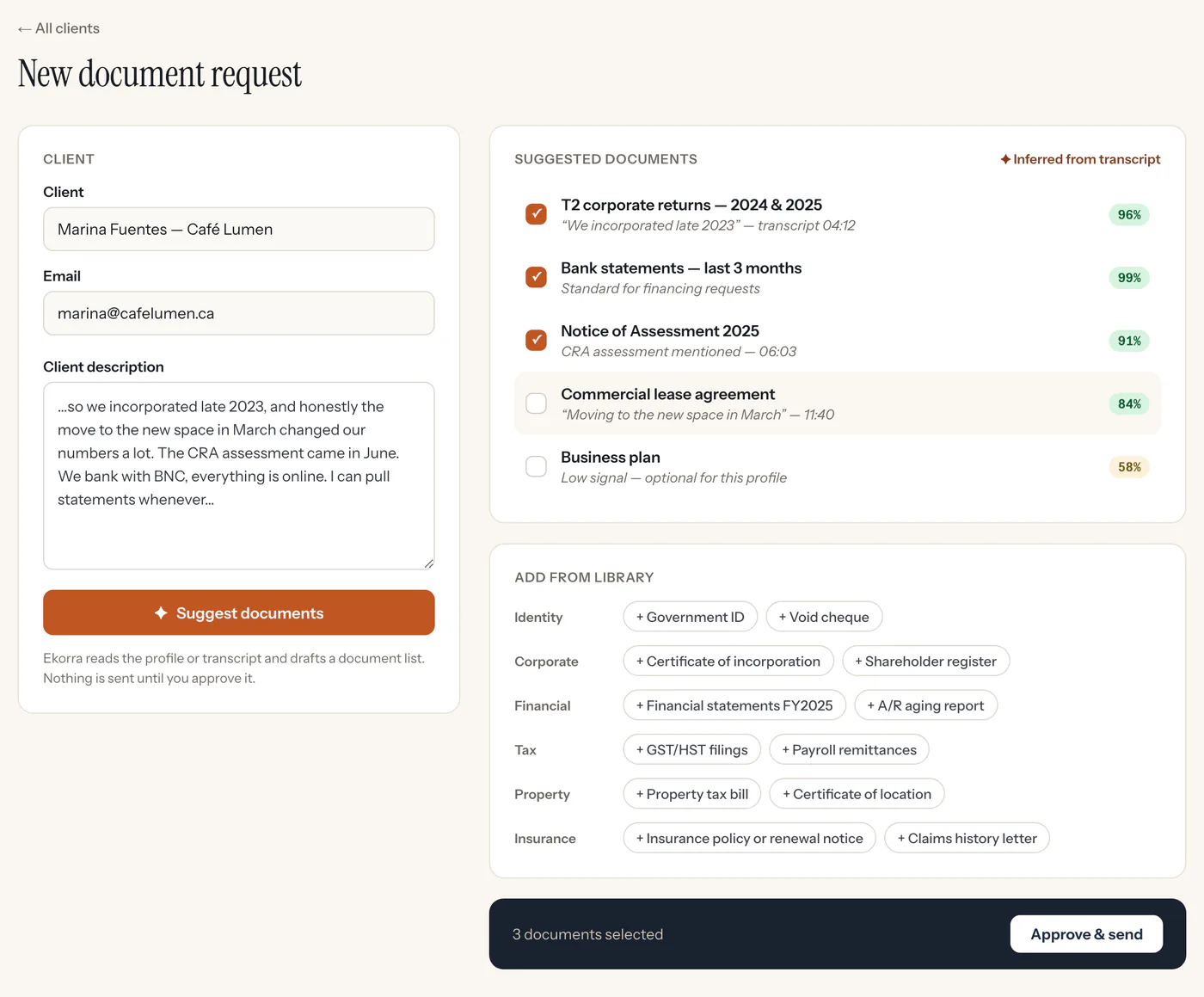
The list drafts itself from the profile
Paste your client’s profile or your call transcript. The AI proposes each document with the quote that justifies it and a confidence level; you tick, adjust, approve — nothing goes out without you.
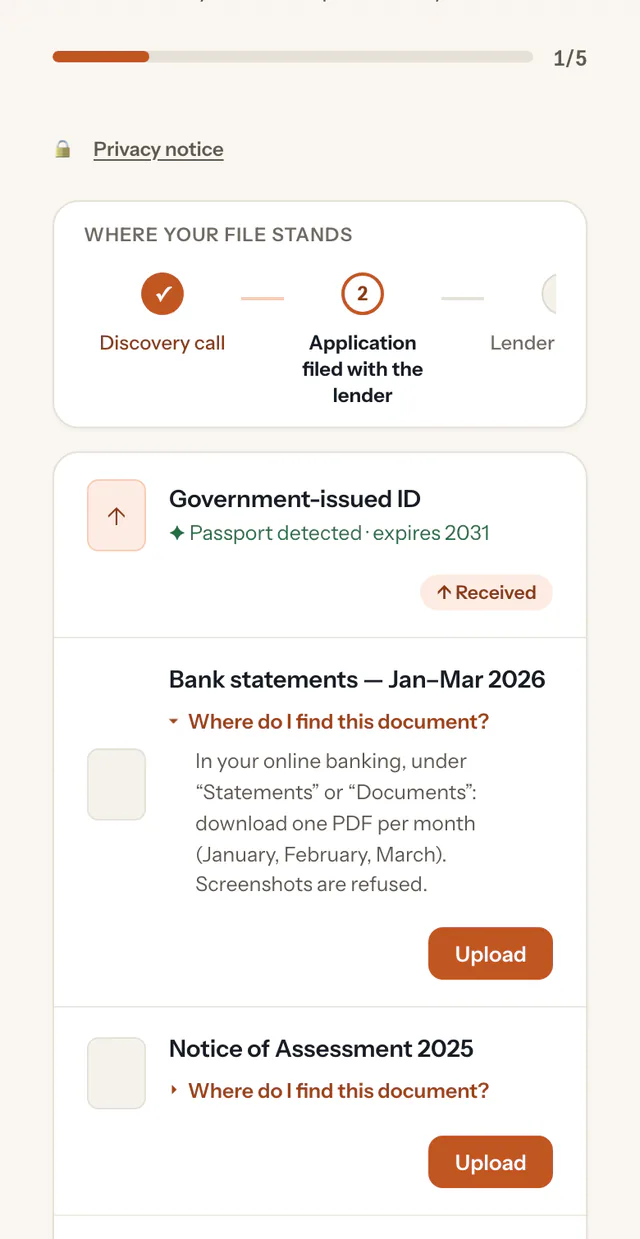
Your client uploads from their phone
They get a secure link by email: no account, no password, no app to install. Under each document, “Where do I find this?” tells them where to look, in their language.
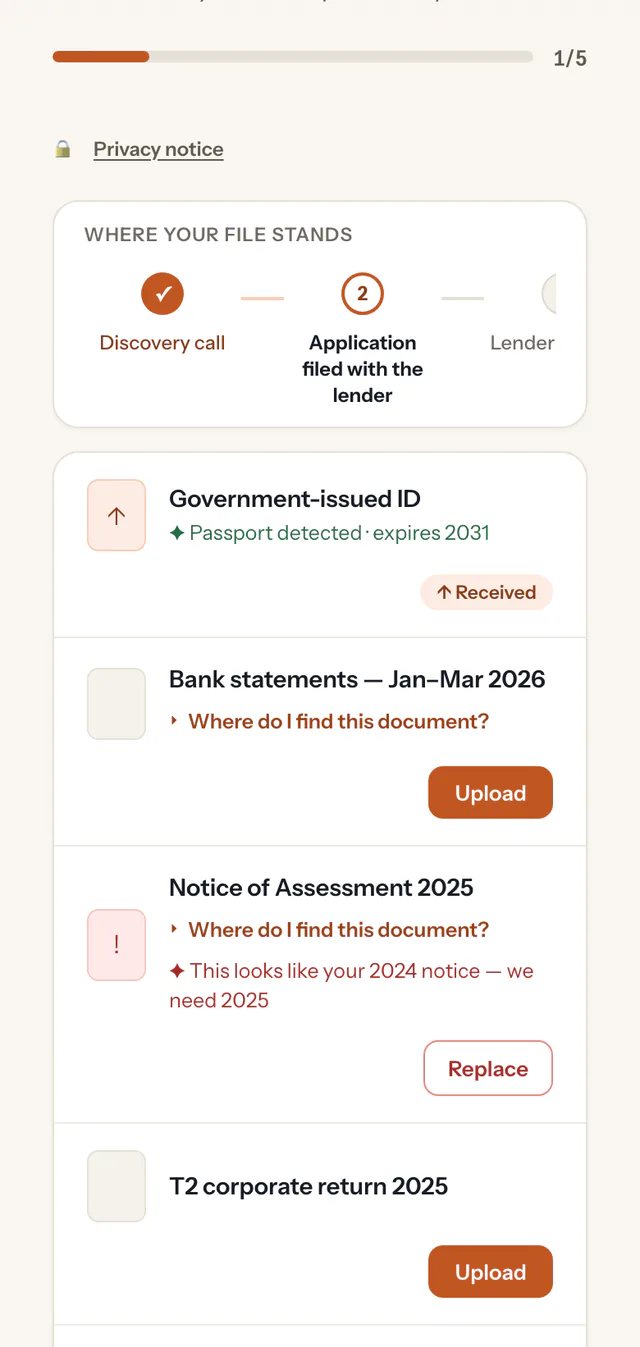
Every file is checked on arrival
Wrong year, unreadable scan, wrong file: the portal tells your client right away and explains what to fix. They replace the file themselves — no email back-and-forth.
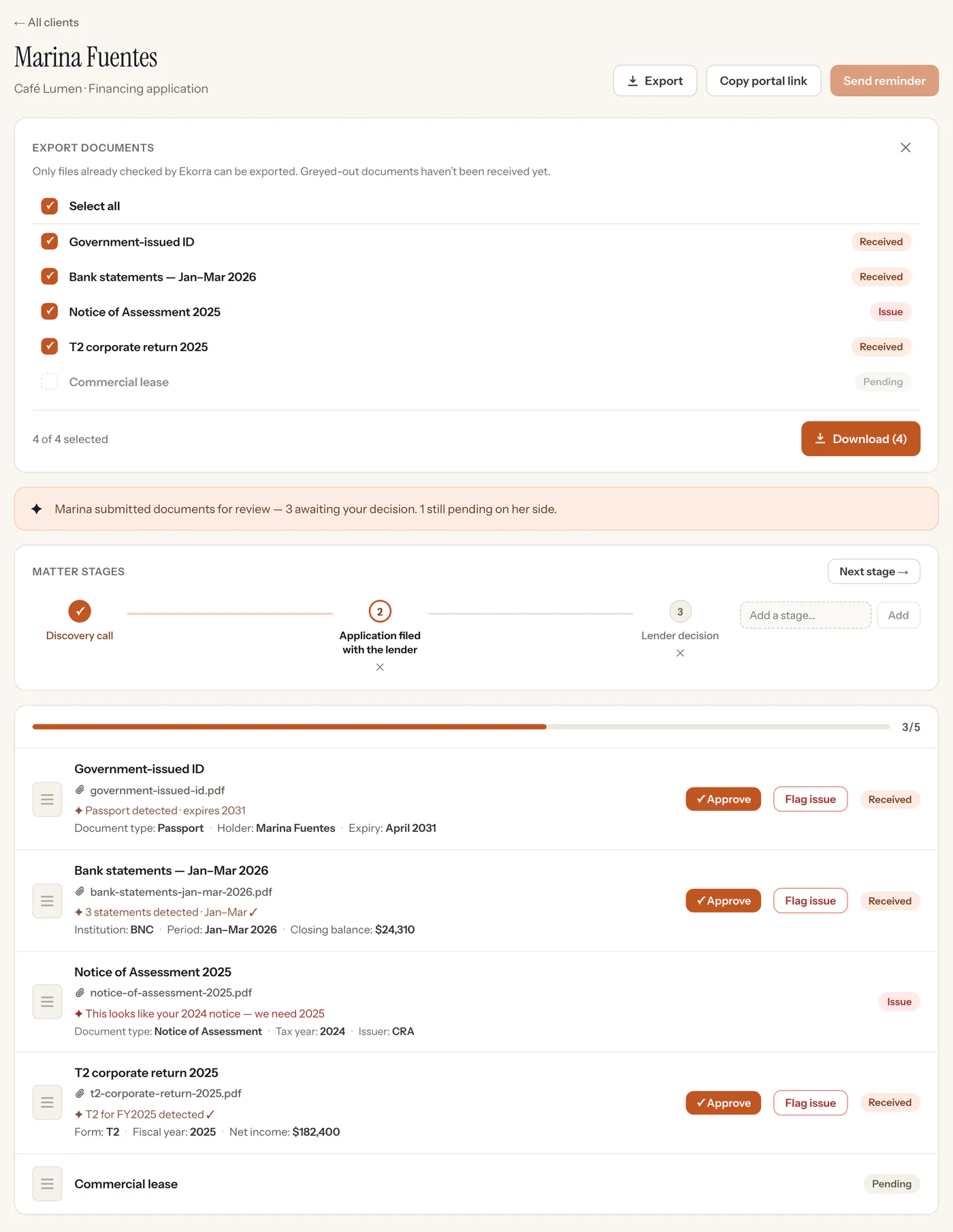
You review once, then you export
The file reaches you submitted — complete or partial — with a check note and key fields for every document. You approve or reject each one, then export everything as a cleanly named ZIP archive.
Email was never built for this
The same collection, two ways to live it.
We publish no time-saved figure: we haven’t measured one yet. That is exactly what our pilot program is for.
What Ekorra does differently
AI checks on arrival
Every upload is examined as it lands: right document, right period, readable. Your client fixes it immediately — not three days later.
A list inferred from the conversation
A client profile or a call transcript is enough. The AI proposes the documents, with cited evidence and a confidence level — and you approve before anything goes out.
A guided client
A simple, bilingual portal (English and French), no account to create — one secure email link — and an assistant that explains where to find each document.
Built for trust
Hosted in Canada
Your data is stored and the AI processing runs in Google Cloud’s Montréal region.
Encrypted
Your clients’ files are encrypted in transit and at rest.
The AI assists, you decide
No automatic decisions: you approve the list before it’s sent and review every document before closing the file.
Limited retention
Documents are permanently deleted 12 months after a request is closed.
A security questionnaire to fill in? Write to us: contact@ekorra.com.
Who’s behind Ekorra
Ekorra is a product of Neural North, a Montréal company. The product is designed, run and supported from here — and when you write to us, the team that builds it is the one that answers.
Julien Mercier, founder of Ekorra, is a computer engineer by training who specializes in data and AI, with 15 years of experience. He holds an MBA from HEC Montréal (2024) and is a startup enthusiast.
We built Ekorra so documents stop travelling by email — and so checking them, the most thankless task in a firm, is no longer waiting for you when you open the file. The AI does the sorting; the decision stays yours.
We’re looking for a few pilot firms
Three to five firms, no more: we want to work closely with each one. The 3-month trial is the same for everyone; the pilot program adds a direct relationship with the team.
What you get
- A 30-minute kick-off session with the founder, on your real file types.
- During the first month, twenty minutes a week to tell us what gets in your way: your requests weigh first in our priorities.
- Your case templates set up with you: documents, check rules, client help text.
- Our data processing agreement (DPA), published at ekorra.com/en/dpa, and, on request, our answers to your firm’s security questionnaire.
What we ask of you
- Use Ekorra on real files during the 3 months.
- Twenty minutes of candid feedback a week during the first month, then one conversation at the end of the 3 months.
- At the end, a short case study — anonymous if you prefer.
Tell us your line of work, the size of your firm and the kind of file you open most often. We answer every application.
Frequently asked questions
Start your first file today
Sign in with Google or with a link sent to your email, describe your client’s situation, and send them a secure link. No setup call.
3-month free trial · no credit card