Real-estate brokers: your sellers’ and buyers’ documents, without texts or attachments
Your brokerage forms are well framed; the documents around them arrive by text, by email and on paper. Ekorra asks your client for them, checks every file on arrival and shows you at a glance what is still missing.
3-month free trial · no credit card
The documents you already ask for
Three case templates are ready the first time you sign in. Each document comes with its check rule and a help text for your client — you can edit everything.
Seller listing
- Certificate of location
- Municipal and school tax bills
- Seller’s declaration form (signed)
- Deed of sale (title)
- Depending on the situation: mortgage statement; lease of the rented dwelling; condo syndicate documents (declaration, financial statements, minutes)
- When needed: invoices and warranties (roof, heat pump, windows)
Accepted offer — buyer side
- Government ID
- Mortgage pre-approval letter
- Financing approval (lender commitment)
- Proof of down payment
- Depending on the situation: gift letter; pre-purchase inspection report
- When needed: proof of home insurance and void cheque for the notary
Rental — tenant application
- Proof of income (two most recent pay stubs or letter of employment)
- Current or previous landlord reference
- Depending on the situation: notice of assessment if self-employed; guarantor’s proof of income
- When needed: government ID
The rental template is short on purpose. It never asks for a social insurance number, a credit report, a health card, a bank statement, a criminal record or immigration status.
How it works
At listing or acceptance, the list goes out
Pick Seller listing or Accepted offer, paste your meeting notes. Ekorra adds what the situation calls for — a condo, a rented unit, a gifted down payment — quoting the passage that justifies it. You approve, your client gets their link.
Your client uploads, every document is checked
A municipal tax bill sent instead of the school one, a pre-approval instead of the financing approval, an unsigned form: the portal flags it on arrival and explains what to redo.
You see what’s missing, you export
The dashboard shows, for each client, the documents received, checked and flagged. You review the submitted file — complete or partial — export everything as a ZIP and add it to your agency’s transaction file.
What changes in your week
One place while the deadlines run — Financing, inspection, condo documents: you see at a glance what has arrived and what is missing, without digging through your texts.
The right document, not its cousin — The templates’ rules tell a pre-approval from an approval, a municipal bill from a school one. Your client finds out at upload, not three days later.
Your clients know where to look — “You received it at the notary when you bought; otherwise your notary or the surveyor can provide a copy”: every document has its help text, which you can rewrite.
Your client follows the stages — Offer accepted, financing, inspection, conditions met, notary closing: you advance the stage, they see it in their portal.
What your clients see
An email in your name, one link, and a phone is enough.
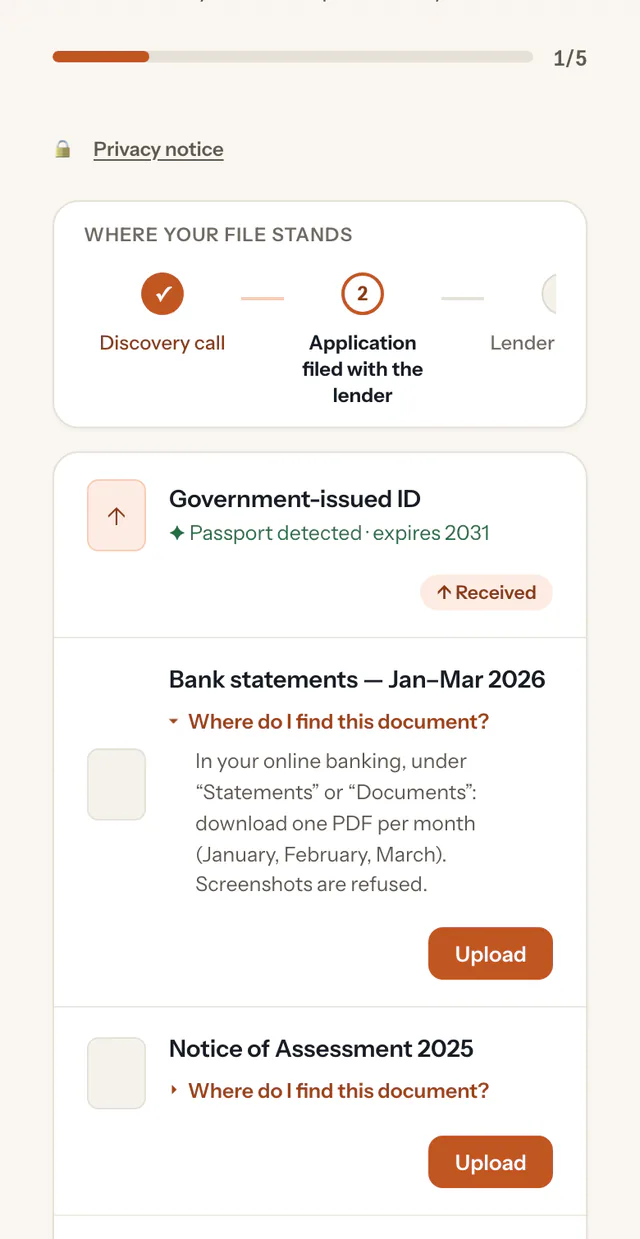
A portal carrying your name and logo, in French or English, with no account and no password.
The list of what you’re asking for, a progress bar and, under each document, “Where do I find this?”.
An immediate answer after each upload, and the option to add a document you hadn’t asked for — a roof warranty they just found, for instance.
A clear notice, before uploading, about what happens to their documents — and a button to write to you.
Built for trust
Hosted in Canada
Your data is stored and the AI processing runs in Google Cloud’s Montréal region.
Encrypted
Your clients’ files are encrypted in transit and at rest.
The AI assists, you decide
No automatic decisions: you approve the list before it’s sent and review every document before closing the file.
Limited retention
Documents are permanently deleted 12 months after a request is closed.
Ekorra collects the documents around your forms; it does not replace them, and it does not replace your agency’s record keeping — export, then add to the official file. Our templates ask only for what the file needs, and their rules tell the AI not to report ID numbers, account numbers or tenant names. Ekorra passes no judgment on an applicant, an inspection or a seller’s declaration: it checks that the right document arrived, readable and signed.
Frequently asked questions
Your next listing, without the document hunt
Create your account, pick “Real-estate brokerage”: your three templates are ready and your first request can go out within minutes.
3-month free trial · no credit card