Mortgage brokers: stop chasing your clients’ documents
Ten to twenty documents per file, and one stale statement is enough to delay everything. Ekorra drafts the list from your discovery call, checks every file on arrival and tells your client right away what to fix.
3-month free trial · no credit card
The documents you already ask for
Two case templates are ready the first time you sign in — New mortgage and Refinancing. Edit them, create more: they’re yours.
Always requested
- Government ID
- Recent pay stubs (2 most recent)
- Letter of employment — with the rule “dated within the last 60 days”
- Bank statements (last 90 days)
- Proof of down payment
- Notice of assessment (latest)
- For a refinancing: current mortgage statement and property tax bill
Added depending on the client’s situation
- Changed jobs in the last 12 months: pay stubs and T4 from the previous employer
- Part of the down payment is a gift: gift letter
- Self-employed: T1 generals and notices of assessment (2 years)
One click away, when needed
- Separation or divorce agreement
- Proof of home insurance
“Depending on the situation”: the AI reads your profile or transcript, proposes the document and quotes the passage that justifies it (“‘I changed employers in March’”). You untick what doesn’t apply; nothing goes out without your approval.
How it works
After the discovery call, the list is ready
Paste your notes or the call transcript, pick the New mortgage or Refinancing template. Ekorra proposes the documents with cited evidence; you adjust, approve, and your client gets their link.
Your borrower uploads, every document is checked
A statement older than 90 days, a stale employment letter, the wrong-year notice of assessment: the portal flags it on arrival and explains what to fix. Your client replaces the file themselves.
You review, export, and package the file
The file reaches you submitted — complete or partial, so you can move ahead without waiting for the last document. You approve each document, export everything as a ZIP, and carry on in your packaging and submission tools.
What changes in your week
The wrong statement no longer waits for you — Period, year and legibility are checked the second the file lands. You no longer find out while packaging the file.
Your requirements, in one sentence — “Dated within the last 60 days”, “all three months, no screenshots”: write the rule the way you’d say it, and it is applied to every upload.
Your clients follow progress without calling you — Analysis, packaging, lender submission, approval, closing: you advance the stage, your client sees it in their portal.
A reminder that says what to send — One click, one email in your firm’s name, listing exactly what is still missing.
What your clients see
An email in your name, one link, and that’s it.
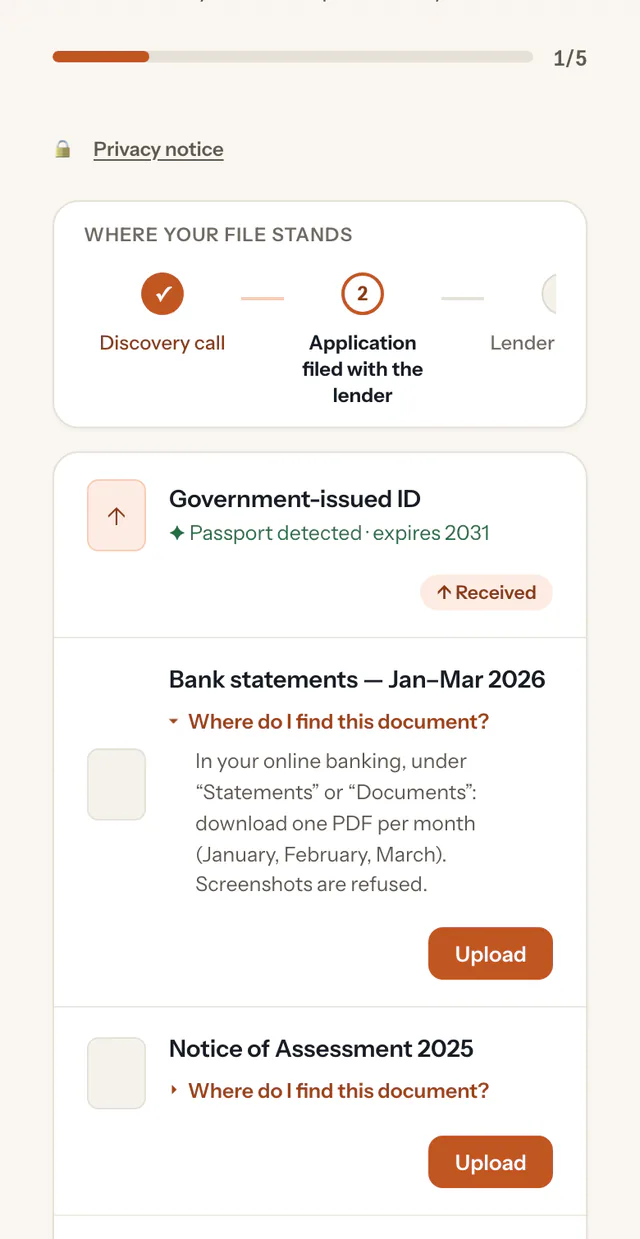
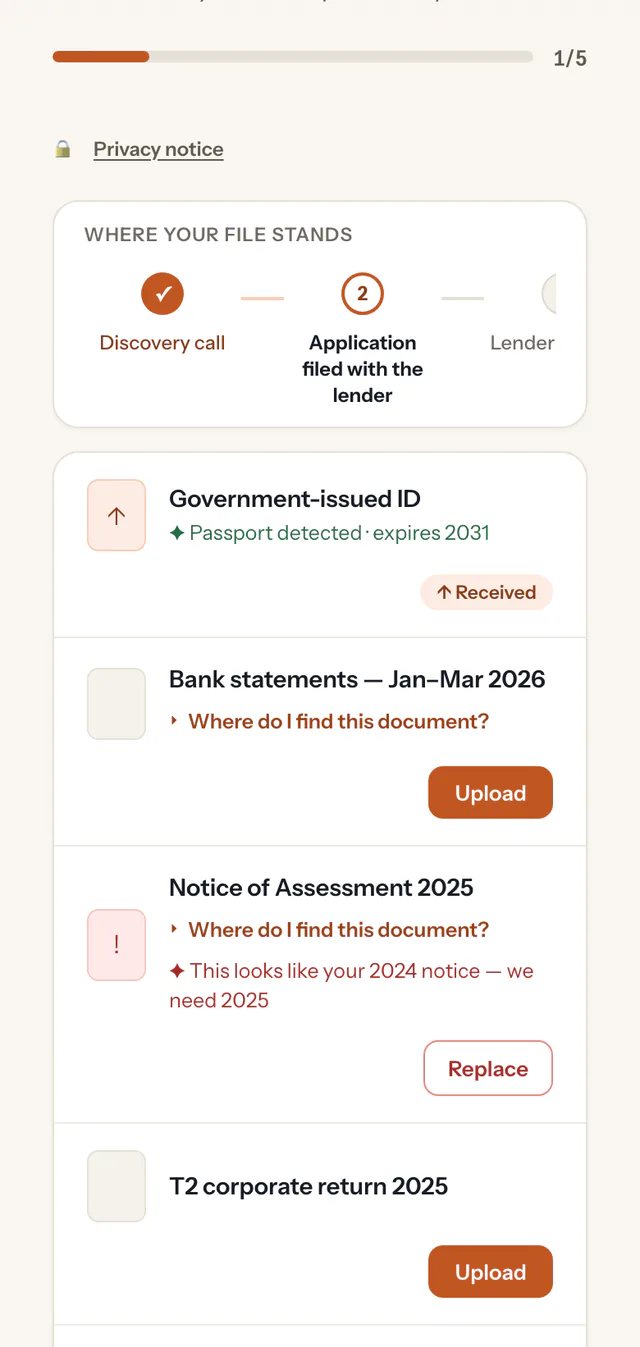
A portal carrying your firm’s name and logo, in French or English, with no account and no password.
The list of what you’re asking for, a progress bar, and under each document “Where do I find this?” (“CRA My Account → Mail → Notice of assessment…”).
After each upload, an immediate answer: “Notice of Assessment 2025 detected”, or what needs fixing.
A clear notice, before uploading, about what happens to their documents — and a button to write to you.
Built for trust
Hosted in Canada
Your data is stored and the AI processing runs in Google Cloud’s Montréal region.
Encrypted
Your clients’ files are encrypted in transit and at rest.
The AI assists, you decide
No automatic decisions: you approve the list before it’s sent and review every document before closing the file.
Limited retention
Documents are permanently deleted 12 months after a request is closed.
Ekorra checks that the right document arrived — right type, right period, readable. It does not verify your clients’ identity, does not judge income or eligibility, and makes no credit decision: your professional and regulatory obligations remain yours.
Frequently asked questions
Your next file, without the document chase
Create your account, pick “Mortgage brokerage”: your two templates are ready and your first request can go out within minutes.
3-month free trial · no credit card