Accountants: stop chasing client documents at every year-end
The wrong-year notice of assessment, the unreadable statement, the document still missing the night before the deadline. Ekorra drafts the list from your client’s profile, checks every file on arrival and tells them right away what to fix.
3-month free trial · no credit card
The documents you already ask for
Two case templates are ready the first time you sign in, with a library of everyday documents. Edit them, create more: they’re yours.
Year-end
- Bank statements (12 months)
- Financial statements
- GST/HST filings
- Depending on the situation: payroll remittances if the business has employees; vehicle or equipment purchase agreements if any this year
- When needed: A/R aging report
GST/QST filing
- Sales summary for the period
- Bank statements for the period
- Purchase invoices with taxes paid
- When needed: previous filing confirmation
In the library, to build your own templates
- Certificate of incorporation, shareholder register
- Government ID, void cheque
- And any document you name yourself: T4, RL-1, notice of assessment, receipts — with your own check rule
For personal tax season, build your template once — or paste the client’s profile: the AI proposes the documents and quotes the passage that justifies each one (“‘incorporated late 2023’”). You decide what is requested; Ekorra gives no tax advice.
How it works
From the onboarding email to the list
Paste your client’s profile, their emails or your call transcript, pick Year-end or GST/QST filing. Ekorra proposes the documents with cited evidence; you adjust, approve, and your client gets their link.
Your client uploads, every document is checked
Wrong tax year, a statement from another period, an unreadable scan: the portal flags it on arrival and explains what to fix. It reads the tax year printed on the notice — not its issue date.
You review once, you export
The file reaches you submitted — complete or partial — with a check note and key fields for each document: year, issuer, period. You approve, export everything as a cleanly named ZIP, and file it in your systems.
What changes in your season
The wrong year stops at the portal — Your client learns at upload that they sent the 2024 notice instead of 2025, and replaces it themselves. You no longer find out when you open the file.
Fewer “where do I find that?” — Each document can carry its help text — “CRA My Account → Mail → Notice of assessment” — and the portal assistant answers from the request. When it doesn’t know, it passes the question to you.
Your rules, in one sentence — “All twelve months, as PDFs, no screenshots”: write the rule the way you’d say it, and it is applied to every upload.
Tracking without a spreadsheet — A per-client dashboard, and a one-click reminder in your firm’s name listing exactly what is missing.
What your clients see
An email in your name, one link, and that’s it — even for your least tech-savvy clients.
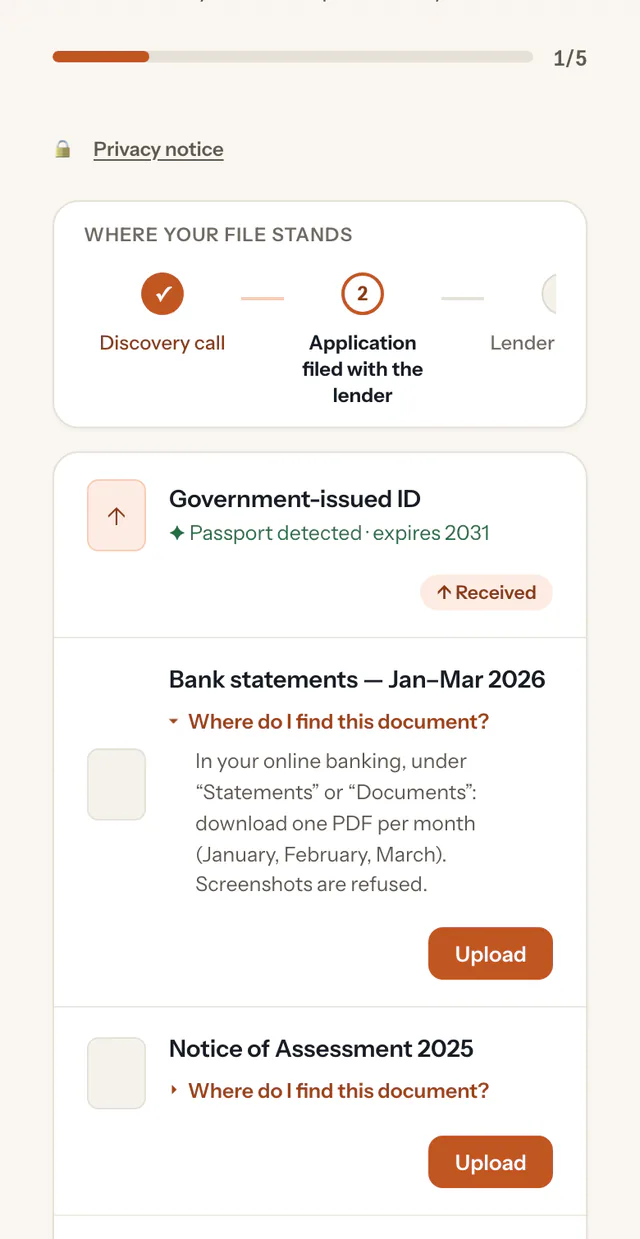
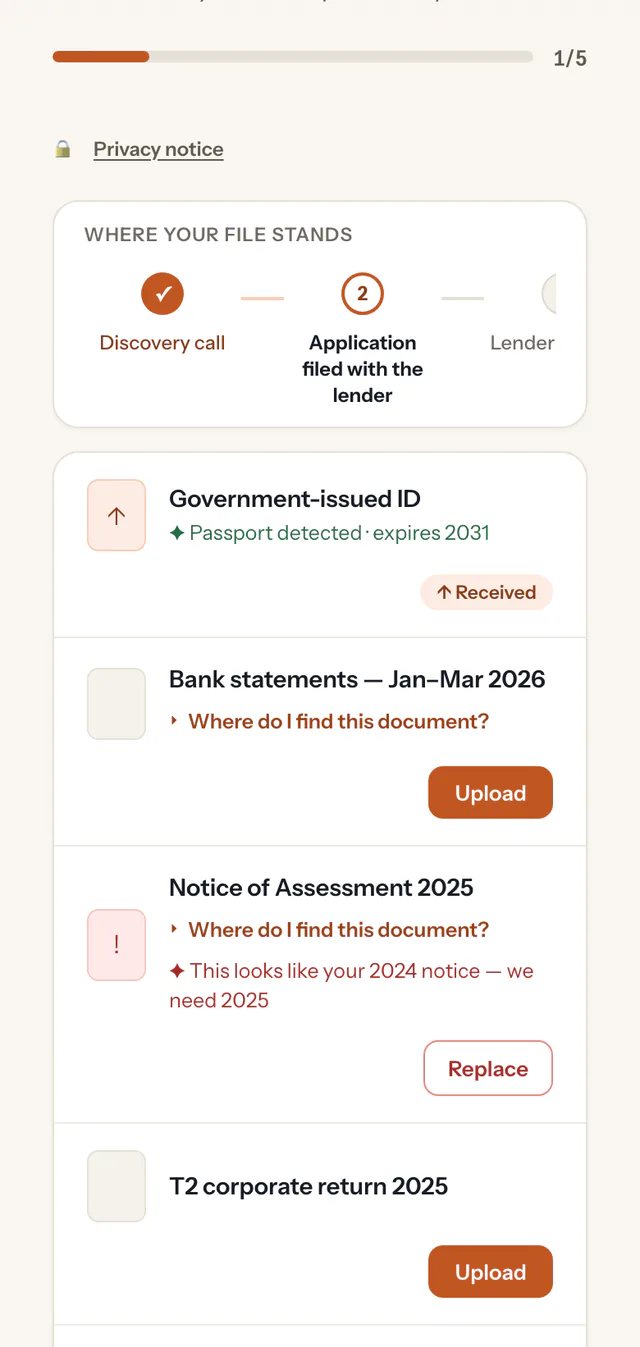
A portal carrying your firm’s name and logo, in French or English, with no account and no password.
The list of what you’re asking for, a progress bar and, under each document, “Where do I find this?”.
An immediate answer after each upload: “Notice of Assessment 2025 detected”, or what needs fixing.
The stages of their file — collection, preparation, review, filing — and a button to write to you.
Built for trust
Hosted in Canada
Your data is stored and the AI processing runs in Google Cloud’s Montréal region.
Encrypted
Your clients’ files are encrypted in transit and at rest.
The AI assists, you decide
No automatic decisions: you approve the list before it’s sent and review every document before closing the file.
Limited retention
Documents are permanently deleted 12 months after a request is closed.
Ekorra checks that the right file arrived; it does no bookkeeping, no calculation and gives no tax advice. The fields shown at your review — year, issuer, period — are there to sort, not to post. And Ekorra is not your archive: documents are deleted 12 months after a request closes; your permanent file stays in your systems.
Frequently asked questions
Your next year-end, without the document chase
Create your account, pick “Bookkeeping & accounting”: your templates are ready and your first request can go out within minutes.
3-month free trial · no credit card